
v0.6.7 · TEST BUILD
Astraloom
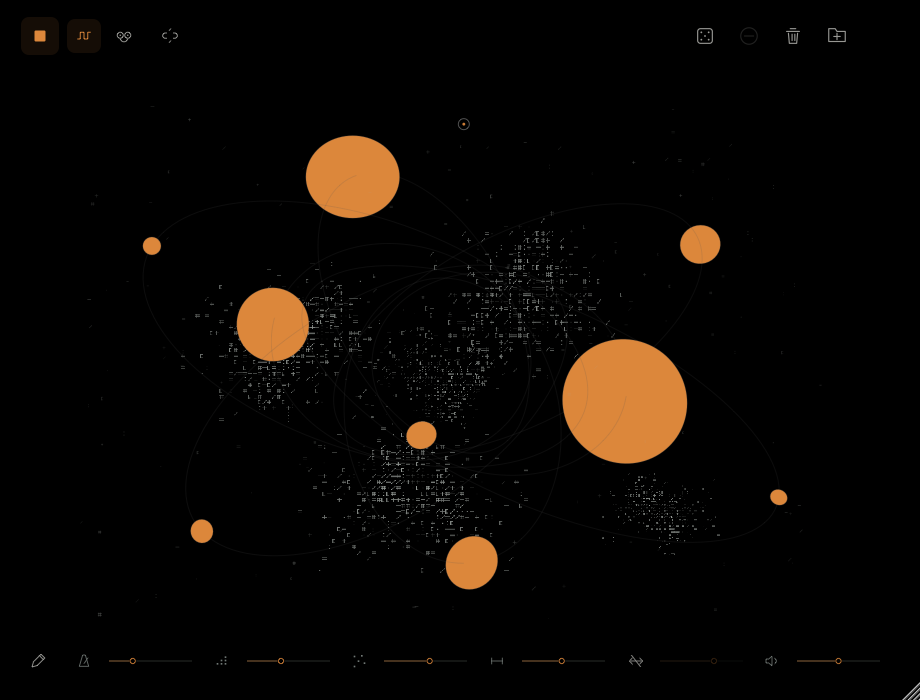
A spatial sampler where each imported sound becomes a circle. Touch its timeline, pull its sound particles, and draw changes in rhythmic speed.
macOS 26 or later. This is a test build; current FL Studio, Ableton and AU-host playback have not been verified. Windows packaging is in progress. No iPhone version is available.
Download
macOS DMGTest build
v0.6.7 · macOS 26+ · Apple Silicon / Intel · 27.8 MB DMG
Download for macOSDeveloper ID signed and Apple-notarized, with stapled tickets. Open the DMG and copy each bundle to its matching Install here folder, following the included guide. This is a manual-copy package, not an automatic installer. This remains a test build. Windows and PKG downloads will follow after verification.
File verification
25a204df20ed996b0de59232aba2b3fc910ffa0e5ffdf3ed53228ce689113600Product information
- Formats
- VST3 · AU · Standalone
- macOS
- 26+ · Apple Silicon / Intel
- Sources
- Up to 256 imported samples
- Sound particles
- 128 · 32 audio voices
- Import your own audio; no factory samples are included.
- Touch a circle to play a slice. Drag a sound particle to change its position, pitch and length; with spatial panning enabled, horizontal movement also changes pan.
- Command-click a small sound particle to pin or unpin it. Command-drag to latch its final position and changed sound; it repeats 12 times per second after release. Double-clicking is no longer needed.
- Toggle spatial panning with the crossed-arrow button. Gray is off and preserves the source stereo; orange is on and follows particle positions. Existing and repeating voices respond without retriggering.
- Add or remove samples without resetting the remaining voices, particles or latches. Latches are temporary and are not saved; stopping or restarting playback clears them.
- Draw a tempo contour in pencil mode. PULSE changes trigger timing; TAPE also changes playback speed and pitch.